


{{ secondMenu.name }}






Subinterfaces are multiple logical virtual interfaces configured on one main interface. Subinterfaces depend on the physical interface, share physical layer parameters of their main interface, or be configured with their respective link-layer and network layer parameters. Main interface status change affects the status of subinterfaces. Subinterfaces can work only when the main interface is connected. The device supports creating subinterfaces on a Layer 3 Ethernet interface and a Layer 3 VLAN-Trunk interface. When a Layer 3 Ethernet interface or VLAN-Trunk interface needs to identify VLAN packets, it can be solved by configuring subinterfaces. This way, packets from different VLANs can be forwarded from different subinterfaces, providing users with high flexibility.
Configure on the Network > Interfaces > Subinterface, and click Add to create subinterfaces, as shown in the following figure.
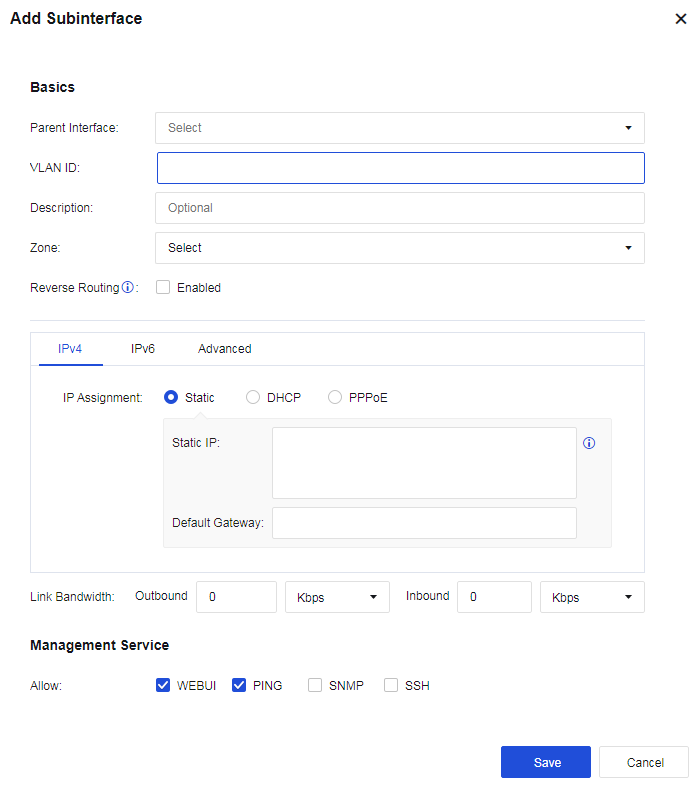
Physical Interfaces: Select the subinterface created on the physical interface.
VLAN ID: The VLAN ID created indicates that the interface supports receiving and sending messages corresponding to the VLAN ID.
Description: Enter the description of the subinterface.
Zone: Select the zone defined for the subinterface.
Reverse Routing: Specify whether data packets are sent out through the same link they come in. You need to enable this option when there are WAN links of multiple ISPs; otherwise, the service may be inaccessible. This option is automatically enabled once WAN Attribute is checked.
MTU in Advanced: Specify the maximum transmission unit of the interface. You can set it in the range of 68-1500.


 {{ $t('index.defaultHeader.chromeBrowserTip') }}