


{{ secondMenu.name }}






The interfaces on the device panel correspond one to one (for example, eth0 corresponds to the management interface). Physical interfaces cannot be deleted or added. The number of physical interfaces depends on the hardware (a few platforms support expansion). This page shows details of each interface, including Name, description, WAN, interface Type, IP Assignment, Zone, IP Address, dialing status, MTU, Link Mode, PING, network interface status, Link State, etc., as shown in the following figure.
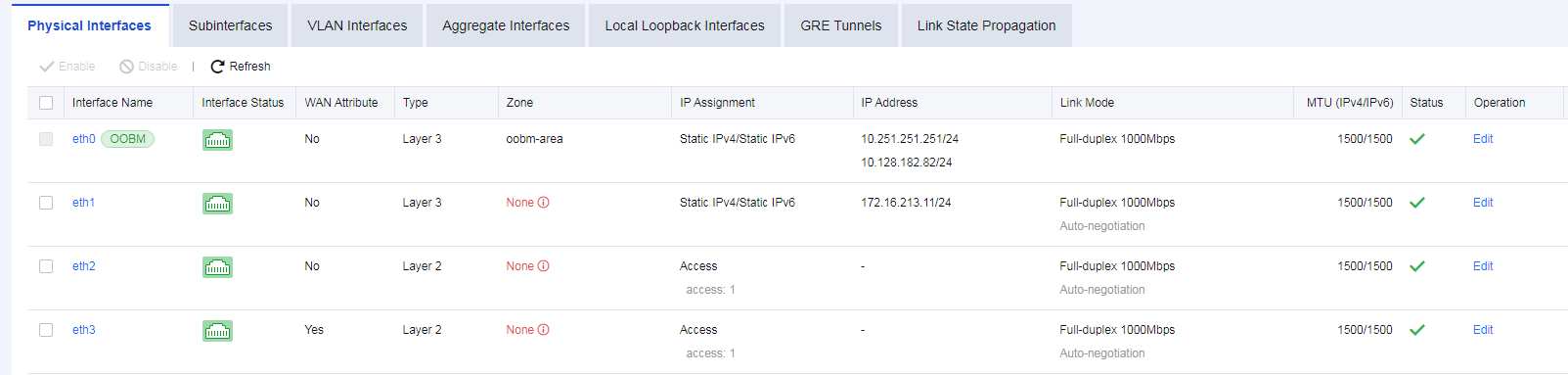
Name: Refers to the name of a network interface. The name of a physical interface cannot be modified.
Interface Status: Indicates the connection status of a network interface. If the connection status is in green, it indicates that the interface is in UP status; if it is in white, it indicates that the interface is in DOWN status.
WAN: Indicates whether a physical interface has WAN attribute(s). Enable this function when traffic control needs to be configured.
PING: Indicates whether it is allowed to enable PING on an interface. You can ping the interface; otherwise, ping is blocked.
Interface Type: Indicates the type of interface. There are four types of interfaces: routing interface, transparent interface, virtual cable interface, and mirror interface.
Zone: Indicates the security zone to which the interface belongs.
IP Assignment: Indicates the type of the obtained IP address of an interface, including PPPoE, static IPv4, DHCP IPv4, static IPv6, and DHCP IPv6.
IP Address: Indicates the IP address configured for an interface.
MTU: Displays the MTU information of an interface. MTU can be configured. MTU range: 68 - 1500.
Link Mode: Indicates the working mode of the physical network card for a network interface and configures the working mode of a physical network card.
Status: Displays the enabled status of an interface.
Operation: Edit interface details.


 {{ $t('index.defaultHeader.chromeBrowserTip') }}