


{{ secondMenu.name }}






You can add an SLB server pool as the destination IP address for destination NAT or bidirectional NAT. An IP address is selected from the server pool as the destination IP address for NAT based on the weighted round-robin algorithm, ensuring balanced traffic distribution across servers.
On the SLB Server Pools page, click Add to add an SLB server pool, as shown in the following figure.
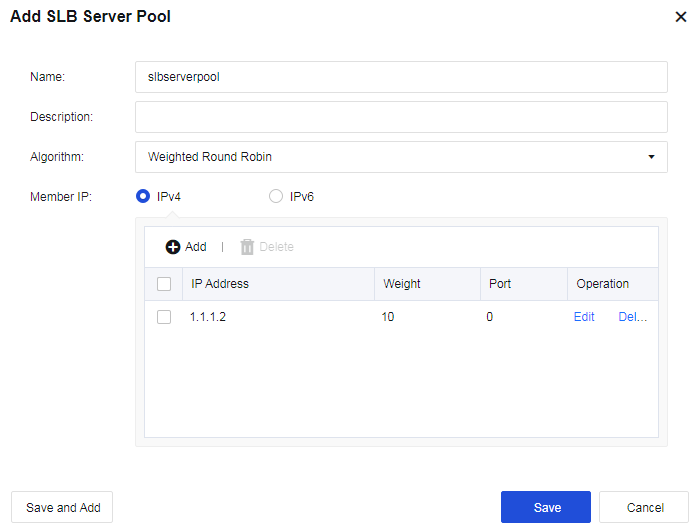
Algorithm: Weighted Round Robin is supported. Weighted Round Robin is a commonly used algorithm in Layer 4 load balancing. It dynamically adjusts traffic distribution based on server loads. The principle of the weighted round-robin algorithm is as follows:

You can configure up to 16 SLB server pools. Each pool can contain 32 combinations of IP addresses and ports at most.
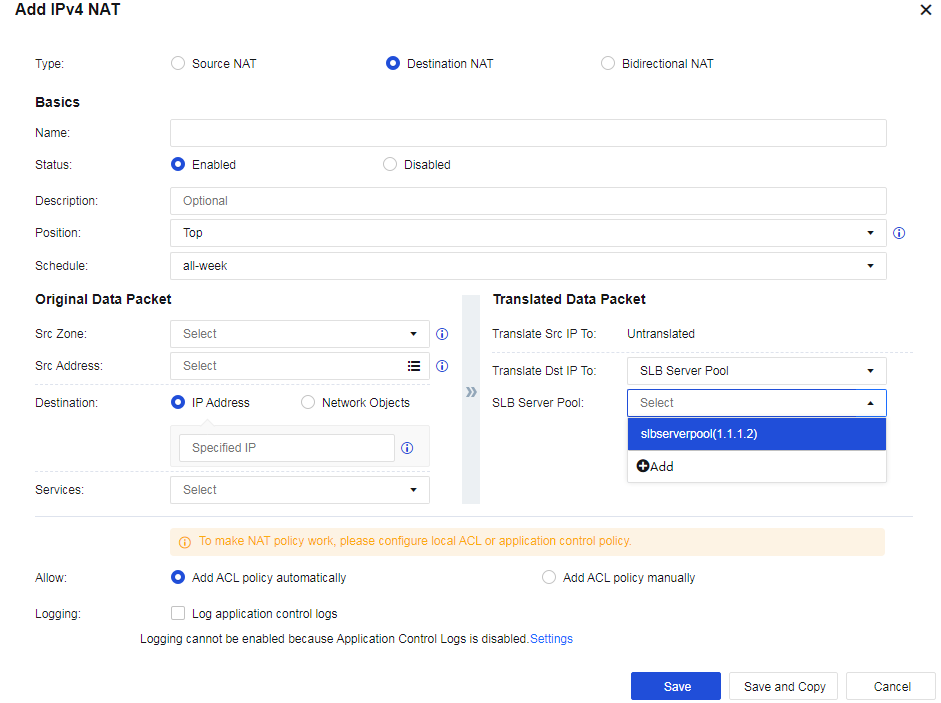
After adding an SLB server pool, you can select it in Translated Data Packet under Policies > NAT when adding destination NAT or bidirectional NAT, as shown in the following figure.


 {{ $t('index.defaultHeader.chromeBrowserTip') }}