


{{ secondMenu.name }}






The Sangfor NGAF device supports the establishment of a standard IPSec VPN connection with third-party equipment.
Click Add Connection to add a standard IPSec VPN connection configuration, as shown in the figure below:
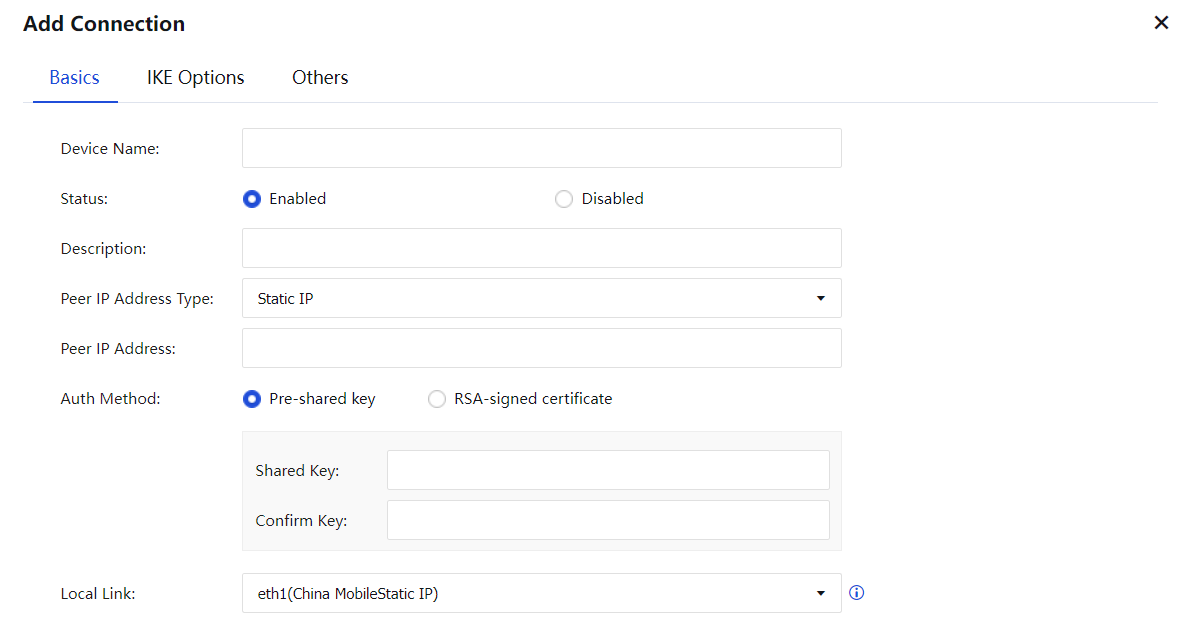
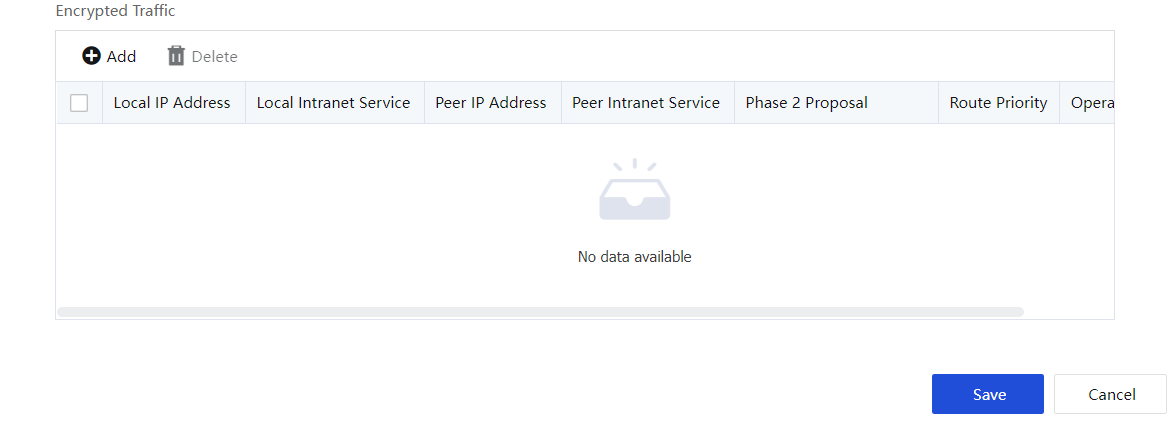
Description of each item in the basic configuration interface:
Device Name: Set the tunnel name.
Status: Enable or disable the VPN connection.
Description: Used to mark the name of the tunnel.
Peer IP Address Type: Including fixed IP, dynamic IP, and dynamic domain name. Please choose according to the actual situation.
Auth Method: Including pre-shared key and RSA signature certificate, which can be selected on-demand.
Pre-shared Key: Fill in the correct pre-shared key, and ensure that both parties to the connection use the same pre-shared key.
Local Link: Select the corresponding WAN line according to the actual line situation.
Encrypted Traffic: Choose to set the interesting stream of the standard IPSec VPN and the parameters negotiated in the second stage. Click Add to configure the stream of interest and negotiation parameters, as shown in the figure below:
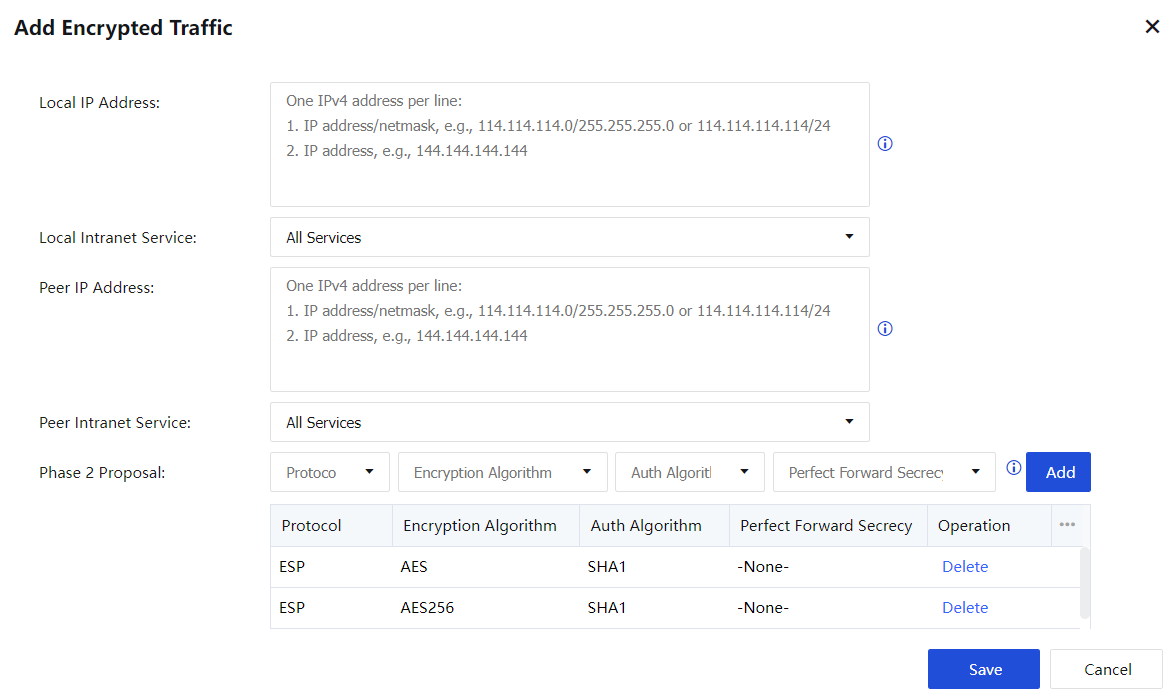
Local IP Address: Set the source IP matching rules of the standard IPSec VPN interesting flow, and you can fill in a single IP or IP network segment.
Local Intranet Service: Set the source intranet service matching rules of the standard IPSec VPN interested flow. You can choose one of the four service types: ALLServices, ALL TCP Services, ALL UDP Services, and ALL ICMP Services.
Peer IP Address: Set the destination IP matching rule of the standard IPSec VPN interesting flow, and you can fill in a single IP or IP network segment.
Peer Intranet Service: Set the target intranet service matching rule of the standard IPSec VPN interesting flow. You can choose one of the four service types: ALLServices, ALL TCP Services, ALL UDP Services, and ALL ICMP Services.
Phase 2 Proposal: Select the parameters used in phase two negotiation, including the protocol used, encryption algorithm, authentication algorithm, whether to enable perfect forward secrecy (PFS). The protocol used for packet encapsulation includes AH, ESP protocol. The encryption algorithms used for data encryption include DES, 3DES, AES, AES192, AES256, SANGFOR_DES. The authentication algorithms for selecting data authentication include MD5, SHA1, SHA2-256, SHA2-384, and SHA2-512.
Priority: Set the priority of the local address and the peer address to identify the routing priority.
After configuring the configuration in the Basic interface, enter the IKE Configuration interface, as shown in the figure below:
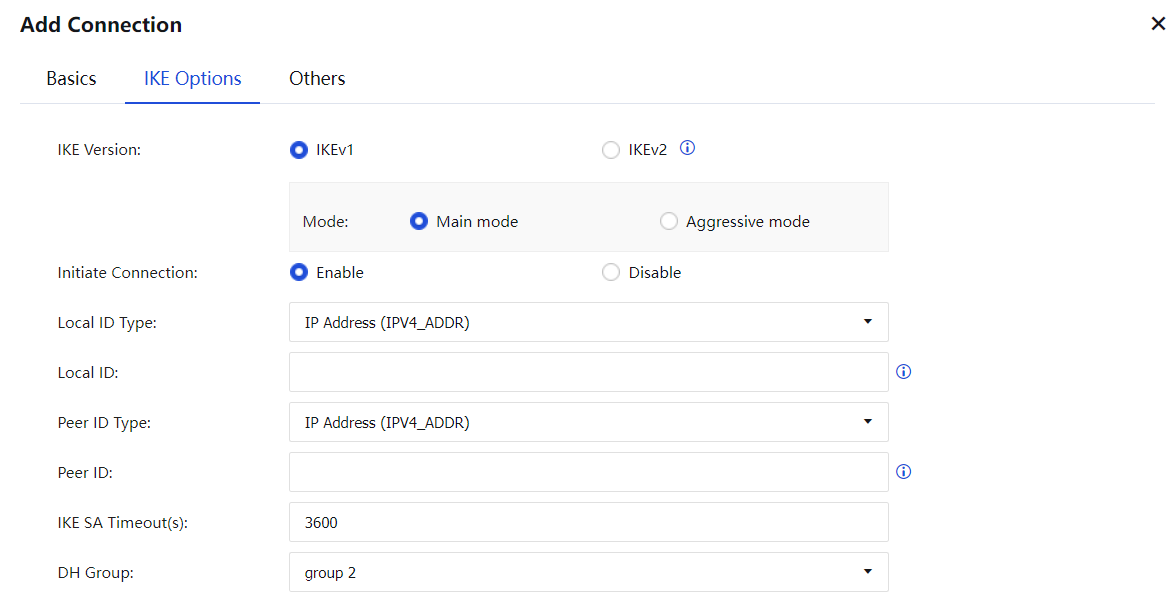
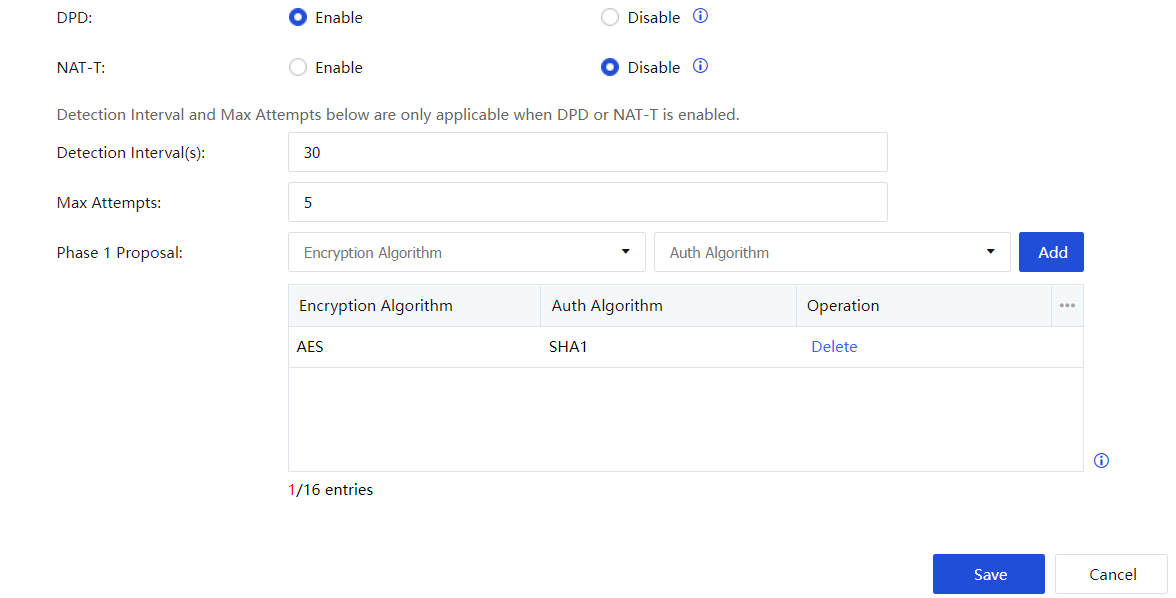
Description of the IKE configuration interface:
IKE Version: Choosing the IKEv1 or IKEv2 version requires the peer to be consistent.
Mode: There are two types of main mode and aggressive mode. The main mode is suitable for both parties with fixed IP or one party with fixed IP and one dynamic domain name and does not support NAT penetration. The aggressive mode is suitable for the case where one of the parties is dial-up and supports NAT penetration.
Initiate Connection: Used to control whether the device actively initiates a VPN connection.
Local ID Type: Set the local identity type to ensure that the peer can recognize the local device. It includes IP address (IPV4_ADDR), domain name character string (FQDN), and user character string (USER_FQDN).
Local ID: Configure according to the type selected by the local ID type.
Peer ID Type: Set the peer identity type to ensure that the peer device can be identified by the local end. It includes IP address (IPV4_ADDR), domain name character string (FQDN), and user character string (USER_FQDN).
Peer ID: Configure according to the type selected by the peer identity type.
IKE SA Timeout(s): The survival time of the first stage of the standard IPSEC negotiation and only supports the time-by-second method.
D-H Group: Set the group type of Diffie-Hellman key exchange, including eight types, 1, 2, 5, 14, 15, 16, 17, and 18. Please keep it consistent with the configuration of the peer device.
DPD: IPSEC uses the Dead Peer Detection (DPD) function to detect whether the peer Peer is alive.
NAT-T: NAT-T is only available in aggressive mode. The main function is to avoid the failure of standard IPSEC negotiation after a device is behind NAT. After NAT penetration is enabled, data will be encapsulated into UDP format for transmission instead of ESP encapsulation. It can also avoid the situation that the internal network does not allow ESP.
Detection Interval(s): Set the detection interval of DPD and NAT-T.
Max Attempts: Set the PDP and NAT-T detection timeout times. After multiple detection timeouts, the device will consider the peer to be invalid and disconnected.
Phase 1 Proposal: Select the parameters used in phase 1 negotiation, including the encryption algorithm and authentication algorithm. The encryption algorithms used for data encryption include DES, 3DES, AES, AES192, AES256, SANGFOR_DES, SANGFOR_NULL. Select data authentication Authentication algorithms include MD5, SHA1, SHA2-256, SHA2-384, and SHA2-512.
After configuring the configuration in the IKE Options interface, enter the Others interface. See figure below:
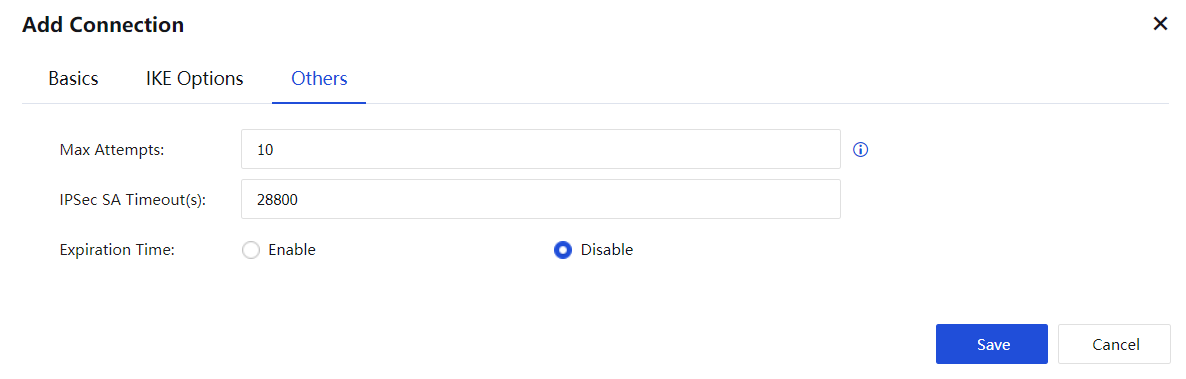
Max Attempts: Set the number of connection retries for standard IPSec VPN.
IPSec SA Timeout(s): Set the timeout time corresponding to IPSec SA.
Expiration Time: Check to enable or disable to select whether the standard IPSec VPN tunnel has an expiration time.
After the configuration is completed, click Save to save the configuration.
Click Edit to adjust the parameters in the VPN connection.
Click View Encrypted Traffic to display the encrypted data stream to view the matching rules of the corresponding encrypted data stream.


 {{ $t('index.defaultHeader.chromeBrowserTip') }}