


{{ secondMenu.name }}






In later versions of Network Secure, the following domains and ports for XLink are required for connection to Platform-X: xlink.sangfor.com.cn:443 (in Chinese Mainland), xlink.sangfor.com.cn:8333 (in Chinese Mainland), sea.xlink.sangfor.com:443 (outside Chinese Mainland), and sea.xlink.sangfor.com:8333 (outside Chinese Mainland). If these domains and ports are not allowed, the integration status of Platform-X will be abnormal after the device is upgraded.
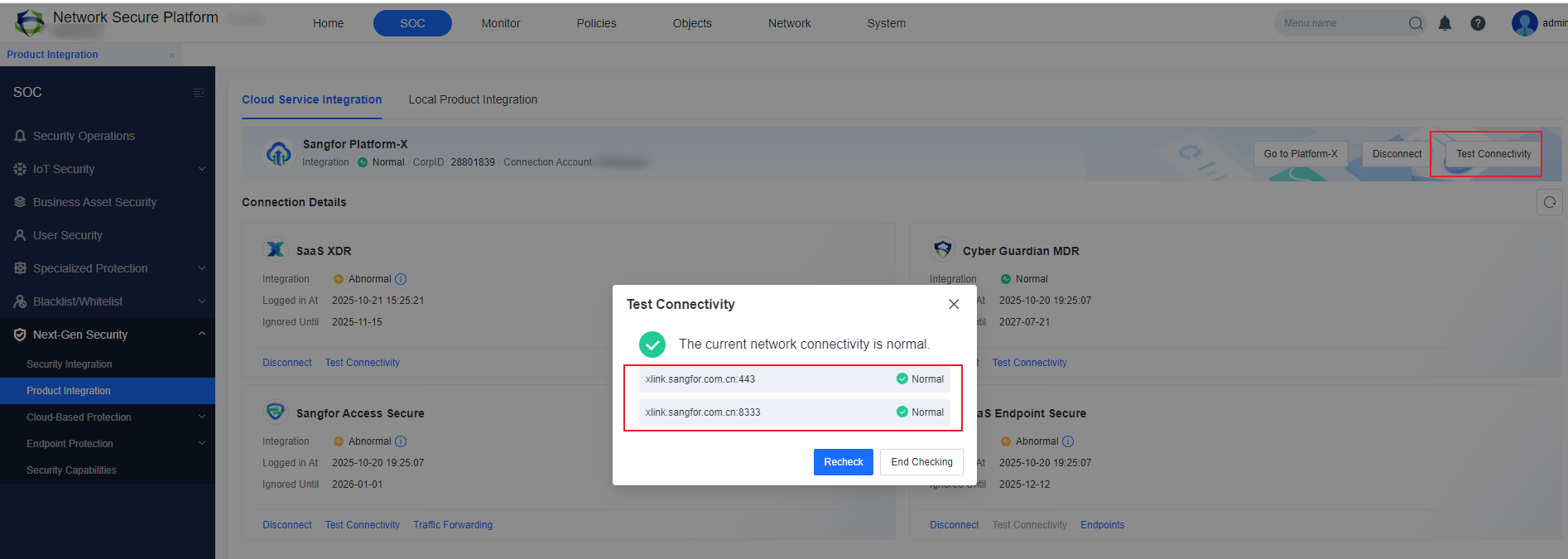
Note: After the upgrade, you can click Test Connectivity to check if the above domains and ports are accessible.
This issue has no impact on the device upgrade. It is recommended to allow the relevant domains and ports before the upgrade to avoid connection errors with Platform-X. After the domains and ports are allowed, reinstall the pre-upgrade check package to test connectivity.
Recommendations:
1. Log in to Network Secure, go to System > General Settings > HOSTS and check whether a domain name resolution error is caused by improper host configuration.
2. Log in to Network Secure, go to Network > DNS and check whether a domain name resolution error is caused by improper DNS server configuration.
3. Log in to Network Secure, go to Network > Routes and check whether the destination network address in the route configuration is accessible.
4. Log in to Network Secure, go to Network > Interfaces and check whether the internet access interface in the interface configuration is normal.
5. Check other internet access control devices to ensure that Network Secure can access the destination network address.
If the issue persists, contact the service provider or Sangfor technical support for troubleshooting.


 {{ $t('index.defaultHeader.chromeBrowserTip') }}