


{{ secondMenu.name }}






| Package |
Download Link |
Description |
| SP |
X86: https://download.sangfor.com/Download/aDeploy/HCI/Patches/sp-HCI-6.11.1-col-20251118/sp-HCI-6.11.1-x86-col-20251118.zip C86: https://download.sangfor.com/Download/aDeploy/HCI/Patches/sp-HCI-6.11.1-col-20251118/sp-HCI-6.11.1-c86-col-20251118.zip |
Fixed known issues of HCI. |
| aDeploy |
https://imdadeploy.sangfor.com:8089/download/new-aDeploy-server-en-upgrade.zip |
A tool used to perform operations such as health checks and queries on HCI. |
1. Obtain the corresponding SP.
Download the corresponding SP from Sangfor Community based on the version and architecture of the HCI cluster and then check whether the MD5 value of the SP is correct.
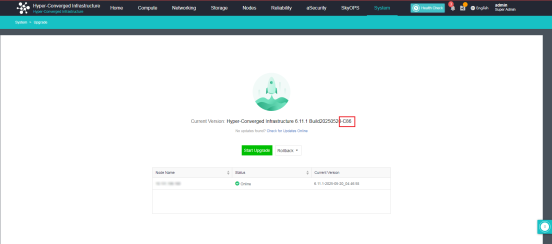
To view the architecture of the HCI cluster, go to System > Upgrade. The architecture is included in the version information. In the following figure, the architecture of the HCI cluster is c86.
2. Obtain aDeploy of the latest version.
Method 1: Download aDeploy of the latest version via the download link and then install it on a computer not connected to the internet.
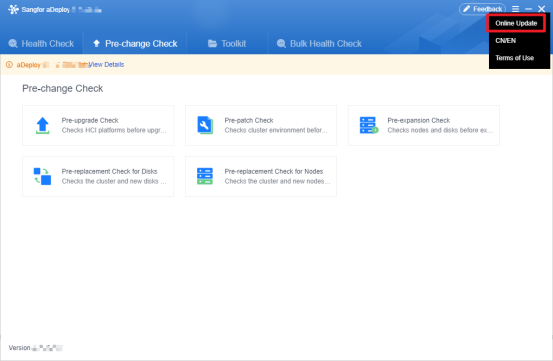
Method 2: For computers connected to the internet, log in to the aDeploy console, click the icon in the upper right corner, and then click Online Update to update aDeploy to the latest version.


 {{ $t('index.defaultHeader.chromeBrowserTip') }}