


{{ secondMenu.name }}






How to handle special types of VMs during upgrade:
If special types of VMs (as defined below) exist in the environment, follow the instructions below to handle these VMs before the upgrade.
Recommendations are as follows:
Method 1: Perform an upgrade using the SP during off-peak hours and shut down these VMs as prompted during the upgrade.
Method 2: If you do not want to shut down these VMs, contact a technical support representative to skip Sangfor aDeploy check, start the upgrade, use Sangfor aDeploy to skip restart of these VMs (as described below) during the upgrade. After the upgrade is complete, restart these VMs during off-peak hours (the impact of not restarting them is also described below).
Special Types of VMs
● VMs not restarted after vmTools installation or uninstallation
● GPU-enabled VMs
● VMs using low-latency NICs
● VMs using encryption cards
● VMs with mappings of physical USB devices
● VMs started with Turbo feature working during the startup
How to skip VM restart using Sangfor aDeploy: Go to Toolkit > Hardware Troubleshooting, select VM restart skip to execute the VM restart skip command on all nodes one by one.
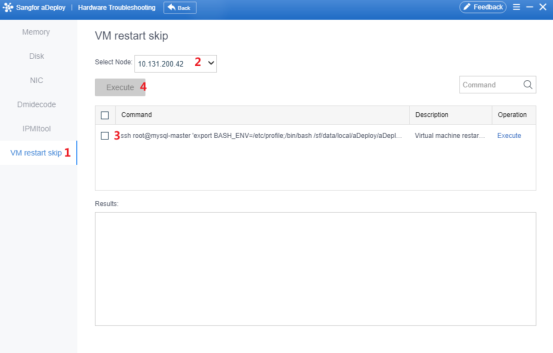
Impact of skipping VM restart: After the upgrade is complete, HA will be triggered during live migration or cross-cluster live migration of the special types of VMs that skipped restart using Method 2.


 {{ $t('index.defaultHeader.chromeBrowserTip') }}